Password Generator
Generate strong, random passwords for your accounts, right in your browser. No signup. Use a unique password per account and a password manager; never enter real passwords into untrusted sites.
Share on Social Media:
This password generator creates strong, random passwords, directly in your browser, to help secure your accounts. Set your options and generate a password. No account, no install, so you can create strong passwords on any device in seconds.
How to Generate a Strong Password Step by Step
- Set your options. Set your options, such as the length and character types, for the strong password you want to generate.
- Generate the password. The tool generates a strong, random password based on your options, right in your browser.
- Get the password. See the generated strong password, a random password you can use to help secure an account.
- Use a unique one per account. Use a unique password for each account, so generate a separate strong password for each rather than reusing one.
- Store it in a password manager. Store your passwords securely, such as in a password manager, so you can use strong, unique passwords without memorising them all.
What Makes a Password Strong
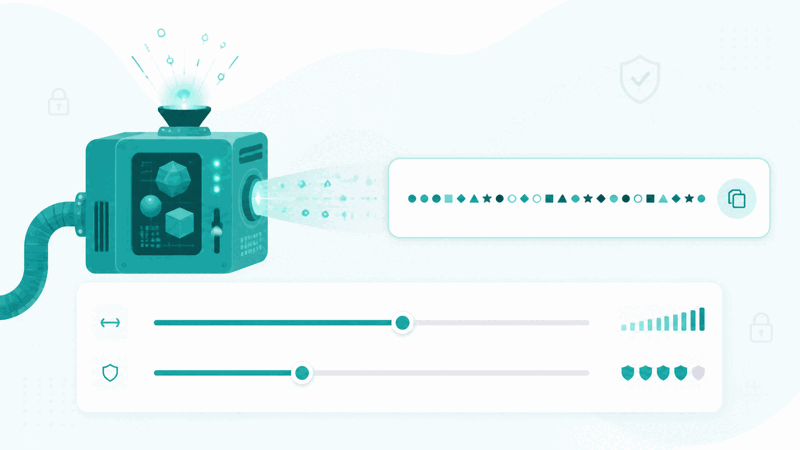
A strong password is long and random, mixing character types, which makes it hard to guess or crack, helping keep an account secure. A password generator creates such strong, random passwords for you, so you do not have to devise them yourself, which often leads to weaker, more predictable passwords. So the generator helps you use strong passwords that better protect your accounts.
The value is strong passwords that better secure your accounts. Weak, short, or predictable passwords are easier to guess or crack, putting accounts at risk, while strong, long, random passwords are much harder to break. So using generated strong passwords, especially a unique one for each account, is an important part of good security, helping protect your accounts from unauthorised access.
Strong random passwords differ greatly from weak ones. A weak password, such as a short or common one, is easy to guess or crack, while a strong random password, long and mixing character types, is very hard to break. So generating strong random passwords, rather than choosing weak, memorable ones, and using a unique password per account, significantly improves your account security compared to weak or reused passwords.
Password generators are used by anyone wanting to secure their accounts with strong passwords: creating strong, unique passwords for their accounts rather than weak or reused ones. Because strong, unique passwords are important for security and hard to devise by hand, a generator that creates them is a valuable security tool, best used with a password manager to store the unique passwords for each account.
Strong Random Versus Weak Passwords
| Aspect | Strong random password | Weak password |
|---|---|---|
| Length | Long | Often short |
| Made of | Random, mixed characters | Predictable or common |
| Security | Hard to guess or crack | Easy to break |
| Per account | Unique each | Often reused |
Who Uses a Password Generator

Pro Tips for Password Security
Common Password Mistakes to Avoid
Related Tools You May Need Next
Our UUID Generator creates unique identifiers, the Hash Generator creates hashes, and the MD5 Generator and other tools support development and security tasks.
Frequently Asked Questions
How do I generate a strong password?
Set your options, such as the length and character types, for the strong password you want, and the tool generates a strong, random password based on your options, right in your browser. See the generated strong password, a random password you can use to help secure an account, use a unique password for each account by generating a separate strong password for each rather than reusing one, and store your passwords securely, such as in a password manager, so you can use strong, unique passwords without memorising them all. This creates strong, random passwords that are hard to guess or crack, better protecting your accounts than weak or predictable passwords you might devise yourself. So the generator helps you use strong passwords for good security. Remember to use a unique password per account, store them in a password manager, favour length and randomness, and never enter your real passwords into untrusted sites or forms, keeping your passwords safe.
What makes a password strong?
A strong password is long and random, mixing different character types, which makes it hard to guess or crack. Length matters because longer passwords are harder to break, and randomness matters because random passwords, without predictable patterns or common words, are much harder to guess than memorable but predictable ones. Mixing character types adds to the strength by increasing the variety in the password. So a strong password combines length, randomness, and varied characters to resist guessing and cracking, helping keep an account secure. Weak passwords, by contrast, are often short, common, or predictable, making them easy to break. A password generator creates strong passwords with these qualities for you, so you do not have to devise them yourself, which often results in weaker, more predictable passwords. So what makes a password strong is being long, random, and varied in characters, which the generator provides, giving you passwords that are hard to break. So for good security, use strong generated passwords with length and randomness, a unique one for each account, rather than weak, short, or predictable passwords that are easy to guess or crack and put your accounts at risk.
Why use a unique password for each account?
You should use a unique password for each account because it limits the damage if any one password is compromised. If you reuse the same password across multiple accounts and that password is ever exposed or cracked on one, then all the accounts using it are at risk, since someone with the password could try it on your other accounts. Using a different, unique password for each account means that a compromise of one password only affects that one account, keeping your others safe. So unique passwords per account contain the risk, preventing one breach from cascading across all your accounts. This is an important security practice: even strong passwords should not be reused, because reuse creates a single point of failure across accounts. A password generator makes it easy to create a strong, unique password for each account, and a password manager makes it practical to store and use them all without memorising them. So using a unique password for each account, rather than reusing one, significantly improves your security by ensuring that if one password is compromised, the others, being different, remain secure, protecting your other accounts from being accessed with the same password.
Should I use a password manager?
Yes, using a password manager is highly recommended, because it lets you use strong, unique passwords for every account without having to memorise them all. Strong passwords are long and random, and using a different one for each account is important for security, but remembering many strong, random passwords is impractical. A password manager solves this by securely storing your passwords, so you only need to access the manager, which fills in or provides the right password for each account. This makes it practical to follow good password security: you can generate a strong, unique password for each account and store it in the manager, using strong, unique passwords everywhere without the burden of memorising them or the temptation to reuse or weaken them for memorability. So a password manager is a key tool for good password security, enabling strong, unique passwords across all your accounts conveniently and securely. So yes, you should use a password manager to store your generated strong passwords, so you can maintain strong, unique passwords for every account without memorising them, combining the password generator's strong passwords with the manager's secure storage for practical, robust account security across all your accounts.
Is it safe to generate passwords here?
This password generator creates passwords in your browser for you to use, and importantly, you should never enter your real, existing passwords into it or any untrusted site; it only generates new passwords for you. The tool's purpose is to create new strong, random passwords, not to receive your existing ones, so there is no need to input any real password. For your security generally, you should always be careful with your passwords: never enter your real passwords into untrusted sites, forms, or suspicious places, only entering them into the legitimate, trusted sites they belong to. When you generate a new password here, treat it as a new password to set on an account and store securely, such as in a password manager. So using the generator to create new passwords is straightforward, and you keep your security by not entering existing real passwords anywhere untrusted, storing your generated passwords securely, and using them properly. So generate new strong passwords with the tool, store them safely in a password manager, use a unique one per account, and never enter your real passwords into untrusted places, following these practices to keep your passwords and accounts secure while benefiting from strong, randomly generated passwords for good account protection.
How long should my password be?
Your password should generally be long, since longer passwords are stronger and harder to crack, so favouring greater length improves security. While the exact length can depend on the account and any requirements, a longer password is generally more secure than a short one, because length increases the difficulty of cracking it. So when generating a password, choosing a good length, along with randomness and mixed character types, produces a stronger password. Short passwords are easier to break, so you should avoid very short ones and favour longer passwords for better security. The generator lets you set the length, so you can choose a strong, long password. In general, longer and more random is better for password strength, so opt for a generous length when generating your passwords, combined with randomness and varied characters, to get strong passwords that resist cracking. So while there may not be a single required length, the principle is that longer is stronger, so make your passwords long, random, and varied for good security, using the generator to create such strong passwords and a password manager to store them, so length is not a burden to remember since the manager holds your long, strong, unique passwords for each account.
Who should use a password generator?
Anyone wanting to secure their accounts with strong passwords should use a password generator. This includes someone creating a new account, who generates a strong password to secure it from the start; a person replacing weak or old passwords, who generates strong new ones to improve their security; someone wanting a unique password for each account, who generates a separate strong password for each to avoid risky reuse; a person using a password manager, who generates strong passwords to store in it; and anyone strengthening their account security by using strong, unique passwords. So a password generator is useful for essentially everyone who has online accounts and wants to protect them well, since strong, unique passwords are important for security and hard to devise by hand. The common need is good account security through strong passwords, which the generator supports by creating strong, random ones. So from people setting up new accounts to those improving existing security, the password generator serves anyone wanting to use strong, unique passwords rather than weak or reused ones, best combined with a password manager to store the passwords, helping protect their accounts from unauthorised access through strong password security practices.
Is the password generator free?
Yes, it is completely free with no account and no usage limit. You can generate as many strong passwords as you like, as often as you like, at no cost. It runs in your browser on any device, so there is nothing to download or install, and your strong password is ready once generated based on your options. Use it to create strong, random passwords that better secure your accounts than weak or predictable ones, favouring length and randomness for strength. Remember to use a unique password for each account, so a compromise of one does not endanger others; store your passwords securely in a password manager, so you can use strong, unique passwords without memorising them all; replace any weak or reused passwords with strong generated ones; and never enter your real passwords into untrusted sites or forms, keeping your passwords safe. So the generator helps you follow good password security by providing strong, random passwords, best used with unique passwords per account and a password manager, to protect your accounts well at no cost on any device.