Reverse Image Search
Search using an image instead of text, to find where an image appears or similar images. No signup. Ideal for finding image sources, related images and more.
Share on Social Media:
This reverse image search lets you search using an image instead of text, directly in your browser. Provide an image and find where it appears or similar images. No account, no install, so you can search by image on any device in seconds.
How to Do a Reverse Image Search Step by Step
- Provide the image. Provide the image you want to search with, the picture you want to find information about or similar images to.
- Search by image. The tool uses the image to search, finding where the image or similar images appear, based on the picture rather than text.
- See the results. See the results, which may include where the image appears online, similar or related images, and information connected to it.
- Explore the findings. Explore the results to find what you are looking for, such as the source of the image, related images, or its context.
- Use what you find. Use the information you find, such as identifying the source or context of the image, for your purpose.
What Reverse Image Search Is
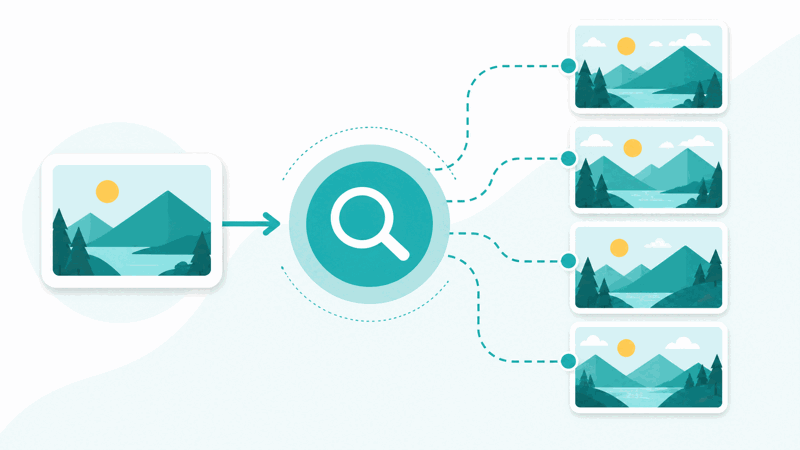
Reverse image search lets you search using an image instead of text, finding information based on a picture. Rather than typing words to search, you provide an image, and the search finds where that image appears, similar or related images, and information connected to it. This is a powerful way to find things about an image that you could not easily search for with words.
The core idea is searching by image rather than by text. A normal search takes text and finds relevant content, while a reverse image search takes an image and finds where it or similar images appear. This is useful when you have a picture and want to know more about it, such as its source, where else it appears, or what it shows, which text search cannot directly do.
Reverse image search has many uses: finding the original source of an image, discovering where an image appears online, finding similar or related images, identifying what is in a picture, and checking whether an image has been used elsewhere. These are things you cannot easily do with a text search, since you are starting from the image itself, making reverse image search a distinct and valuable capability.
People use reverse image search for research, verifying images, finding sources, and curiosity about pictures. A note on privacy: be thoughtful about the images you search with, especially personal or sensitive images, since searching involves providing the image. Used sensibly, reverse image search is a helpful tool for finding information about images, from sources to similar pictures, that text search cannot provide.
Searching by Image Versus by Text
| Aspect | Search by image | Search by text |
|---|---|---|
| You provide | An image | Words |
| Finds | Where the image appears, similar images | Relevant content |
| Useful for | Sources, similar images, context | Text based queries |
| Starting point | A picture | A description |
Who Uses Reverse Image Search
Pro Tips for Reverse Image Search
Common Reverse Image Search Mistakes to Avoid
Related Tools You May Need Next
For working with images, our Image Cropper crops images, the Image tools handle image files, and other image tools help you prepare and manage pictures.

Frequently Asked Questions
How do I do a reverse image search?
Provide the image you want to search with, the picture you want to find information about or similar images to, and the tool uses the image to search, finding where the image or similar images appear, based on the picture rather than text. See the results, which may include where the image appears online, similar or related images, and information connected to it, then explore them to find what you are looking for, such as the source of the image, related images, or its context. Use what you find, such as identifying the source or context of the image. This lets you search by image instead of text, finding things about a picture that a text search cannot.
What is reverse image search?
Reverse image search lets you search using an image instead of text, finding information based on a picture. Rather than typing words to search, you provide an image, and the search finds where that image appears, similar or related images, and information connected to it. So instead of describing what you want in words, you use the image itself as the query. This is a powerful way to find things about an image that you could not easily search for with words, such as its source, where else it appears, or what it shows. It is a distinct capability from text search, starting from a picture rather than a text description.
How is searching by image different from by text?
A normal search takes text, words describing what you want, and finds relevant content. A reverse image search takes an image and finds where it or similar images appear, along with related information. So the difference is the starting point and what you find: text search uses words to find content matching a description, while image search uses a picture to find where that image appears, similar images, and connected information. Image search is useful when you have a picture and want to know more about it, such as its source or context, which text search cannot directly do since you would not know how to describe it in words. So the two search approaches suit different needs.
What can I use reverse image search for?
Reverse image search has many uses: finding the original source of an image, discovering where an image appears online, finding similar or related images, identifying what is in a picture, and checking whether an image has been used elsewhere. These are things you cannot easily do with a text search, since you are starting from the image itself. So people use it for research, verifying images, finding sources, and curiosity about pictures. Whenever you have an image and want to find information about it, its source, where it appears, similar images, or its content, reverse image search provides a way that text search cannot, making it a valuable tool for finding out about pictures using the images themselves.
Can it find the source of an image?
Yes, finding the original source of an image, or where it appears, is one of the main uses of reverse image search. By searching with the image, the tool can find where that image appears online, which can help you trace its source or discover where else it is used. This is something text search cannot easily do, since you would need to describe the image in words. So if you have an image and want to know where it comes from or where it appears, reverse image search is well suited to this, searching by the picture itself to find its occurrences online. So it is a valuable way to trace an image's source or usage, which is a common reason people use reverse image search.
Are there privacy considerations?
Yes, since a reverse image search involves providing the image to search with, there are privacy considerations, especially with personal or sensitive images. You should be thoughtful about the images you search with, considering privacy, because searching means providing the image. So while reverse image search is a helpful tool, it is wise to use it sensibly, being careful about searching with private or sensitive images. For general images where privacy is not a concern, this is less of an issue, but for personal or sensitive pictures, consider the privacy implications before searching. So use reverse image search thoughtfully, bearing in mind that it involves providing the image, and being especially careful with personal or sensitive images.
Does image quality matter for the search?
Yes, a clear, good quality image tends to give better search results, since the search works from the picture you provide. A blurry, low quality, or unclear image may give poorer results, as the search has less clear information to work from. So for the most useful findings, use the clearest, best quality version of the image you can. If you have a choice of images or versions, choosing a clear one improves your chances of good results, such as finding the source or similar images. So while you can search with various images, image quality affects the results, and using a clear, good quality image helps the reverse image search find the most useful information about the picture.
Is reverse image search free?
Yes, it is completely free with no account and no usage limit. You can do as many reverse image searches as you like, as often as you like, at no cost. It runs in your browser on any device, so there is nothing to download or install, and you get results when you search with an image. Use it to find image sources, discover where images appear, find similar images, and identify picture content, searching by image rather than text. Remember to be thoughtful about searching with personal or sensitive images, considering privacy, and to use a clear image for the best results.